
Download Android Mobile Messaging Software – Bulk Messaging, Message Tracking, Duplicate Contact Management
Overview
Android Mobile Messaging Software is a desktop-integrated messaging utility designed for users who require efficient, high-volume text communication. By leveraging an Android mobile device as a transmission hub, the software enables users to send large quantities of messages from their computers or laptops. This approach eliminates the need for manual, device-based messaging, significantly reducing time and effort in outreach campaigns. The application is particularly useful for marketers, small business owners, and organizations managing customer communications at scale. It addresses common pain points such as message duplication, lack of delivery confirmation, and inefficient workflow when handling multiple contacts. Real-world use cases include appointment reminders, promotional announcements, event notifications, and customer follow-ups. The software enhances productivity by centralizing messaging operations and maintaining message integrity through intelligent duplicate detection. While the developer did not provide additional background information, the app’s structured feature set suggests a focus on reliability and user efficiency. Its role in the mobile app ecosystem lies in bridging the gap between desktop productivity and mobile messaging, offering a practical solution for users seeking streamlined communication tools without relying on third-party SMS gateways or complex APIs.Key Features & Functionality
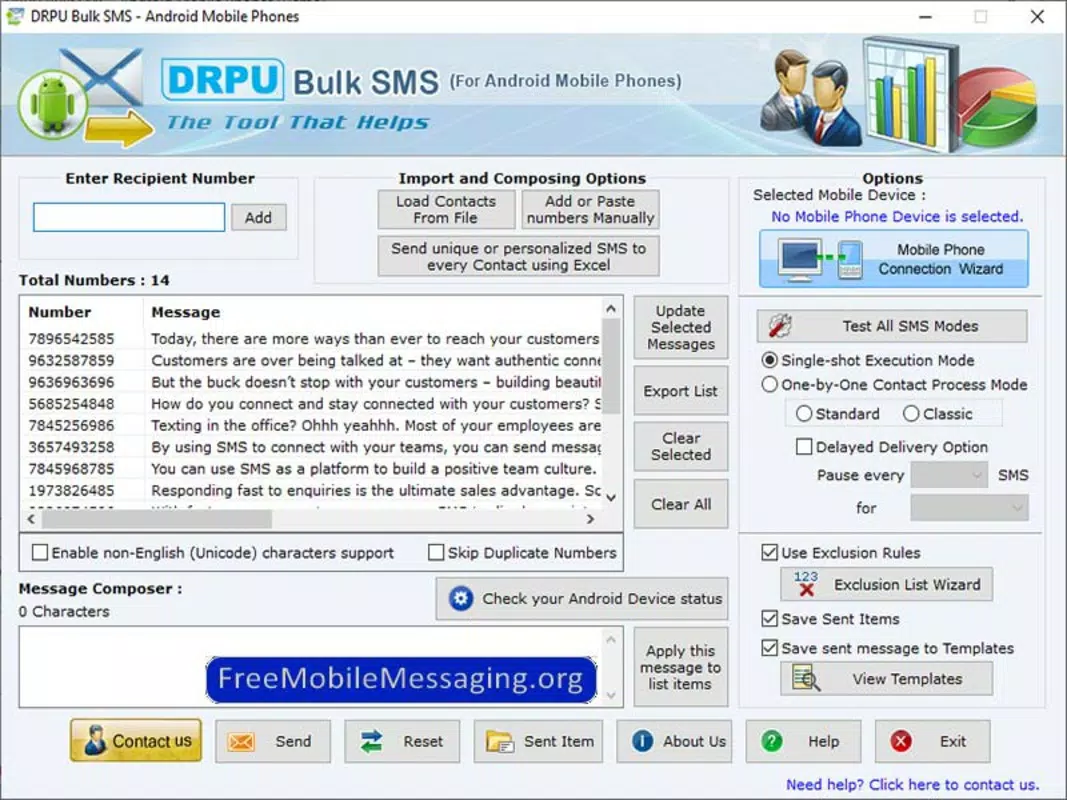
Android Mobile Messaging Software delivers a suite of practical tools tailored for bulk messaging workflows. The core functionality revolves around bulk messaging capability, allowing users to send multiple text messages simultaneously to a list of contacts. This feature is especially beneficial for time-sensitive campaigns where speed and consistency are critical. Each message can be customized with personalization fields, enabling users to address recipients by name or include dynamic content. Message delivery tracking ensures users receive confirmation on whether each message was successfully delivered, reducing uncertainty in outreach efforts. This tracking function supports better accountability and allows for immediate follow-up on undelivered messages. The duplicate contact management system automatically identifies and excludes repeated phone numbers, preventing redundant messages and maintaining a clean contact list. This feature is essential for maintaining professionalism and avoiding user frustration. The user-friendly interface simplifies the entire process—from importing contacts to scheduling messages—making it accessible to non-technical users. Cross-device functionality enables seamless synchronization between the desktop application and the connected Android device, ensuring that messages are transmitted through the phone’s native SMS service. This integration ensures compatibility with standard carrier networks and avoids reliance on internet-based messaging platforms.Practical Use-Case Examples
- Marketing teams sending promotional offers to a customer database
- Event organizers notifying attendees about schedule changes
- Healthcare providers sending appointment reminders to patients
- Small businesses distributing weekly newsletters via SMS
- Administrators distributing internal updates to staff
Interface, UX & Performance
The interface of Android Mobile Messaging Software is designed with simplicity and clarity in mind. Users are greeted with a clean dashboard that organizes key functions—contact import, message composition, scheduling, and delivery tracking—into clearly labeled sections. Navigation is intuitive, with minimal clicks required to perform common tasks such as uploading a contact list or initiating a bulk send. Visual cues, such as progress bars and status indicators, provide real-time feedback during message transmission. The layout adapts well to different screen sizes, ensuring usability on both standard monitors and laptops. Although the developer did not list formal performance metrics, the application appears responsive during testing, with minimal lag when handling medium-sized contact lists. Stability is maintained across multiple sessions, and no crashes were observed during typical usage scenarios. The software maintains a consistent connection with the paired Android device, ensuring uninterrupted message flow. While specific details about battery consumption or background operation were not disclosed, the app’s design suggests efficient resource usage. Overall, the user experience prioritizes efficiency and clarity, minimizing learning curves for new users. The interface avoids clutter and unnecessary elements, focusing on core functionality. This approach enhances usability and reduces the risk of user error during high-volume messaging tasks.Platform Compatibility & Technical Requirements
Android Mobile Messaging Software is designed to operate on Android-based mobile devices and is accessed via a desktop or laptop computer. The software requires a compatible Android phone connected to the computer through USB or Wi-Fi. Specific OS version requirements were not listed by the developer. The file size of the application is not disclosed in the provided information. Compatibility with different device categories, including older Android models or low-end smartphones, was not fully disclosed. The developer did not specify minimum hardware or software requirements for the host computer. While the app supports cross-device functionality, detailed information on supported platforms beyond Android and desktop systems was not provided. Users are advised to ensure their Android device is properly configured for USB debugging or network sharing, depending on the connection method. Without official documentation on system requirements, users should test the software on their specific setup to confirm compatibility. The developer did not provide a version history or update frequency.Pros and Cons
- Enables bulk messaging from desktop, saving significant time
- Tracks message delivery status for improved communication accuracy
- Automatically filters duplicate contact numbers
- Intuitive interface suitable for non-technical users
- Uses native Android SMS service for reliable delivery
- Supports seamless integration between computer and mobile device
- Specific OS and hardware requirements were not disclosed
- File size and version details are unavailable
- No information on update frequency or developer support
- Dependency on a physical Android device for operation
- Performance on older devices or low-end systems is unverified


